
CNIC Information Portal | Easy Verification Resources
Explore CNIC Information resources through our simple online platform. Get helpful verification guidance with a fast, clean, and user-friendly experience.
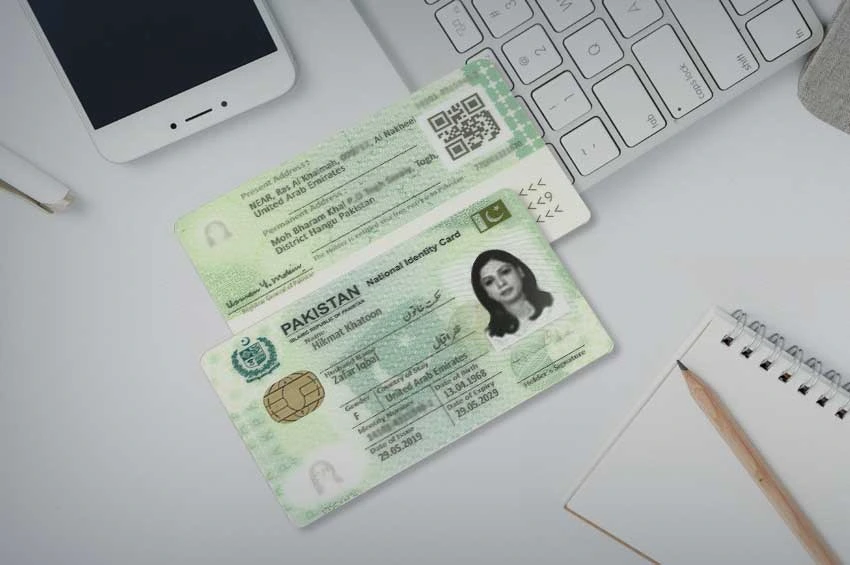
CNIC Information – The Complete Guide to Pakistan’s National Identity Card
Last updated: 28 July 2026 | Reviewed against NADRA’s current verification codes, fee structure, and the Pak-Identity portal workflow.
Every SIM registered in Pakistan, every bank account, every property transaction, and every government service ultimately traces back to one document: the Computerized National Identity Card, or CNIC. “CNIC Information” is searched by people looking for very different things — the structure of the card itself, how to renew or modify it, official NADRA verification channels, or simply how the CNIC connects to the SIM verification checks covered elsewhere on this site. This page is built to answer all of those, with a clear separation between what NADRA itself handles and what belongs to PTA’s telecom verification systems, so you land on the right method the first time rather than sending an SMS to the wrong shortcode.
This guide is published as part of SIM Owner Details, where our focus is Pakistani identity and telecom verification literacy, sourced entirely from NADRA’s and PTA’s official channels.
What a CNIC Actually Is
The CNIC is issued by the National Database and Registration Authority (NADRA) under the NADRA Ordinance 2000, and it is the foundational identity document for every adult Pakistani citizen. As of the most recent NADRA figures, over 252.7 million CNICs have been issued nationally, covering roughly 98.3% of the eligible adult population — making it one of the most comprehensively adopted national identity systems in the region. Every CNIC follows a fixed 13-digit format, typically displayed as XXXXX-XXXXXXX-X.
Reading Your CNIC Number: What Each Segment Means
The 13 digits aren’t random — they encode structured information:
| Segment | Digits | What It Represents |
|---|---|---|
| First block | 5 digits | Regional/district code indicating where the CNIC was originally registered |
| Middle block | 7 digits | A unique serial number assigned to the individual within that region |
| Last digit | 1 digit | A gender-indicating check digit — odd for male, even for female |
This structure is why two family members registered in the same district will often share the same first five digits, while the middle and final digits differ. It’s also why the last digit alone is sometimes (incorrectly) assumed to reveal more personal information than it actually does — it functions purely as a gender/check indicator, not a lookup key to anything else.
Types of NADRA Identity Documents
“CNIC” is the umbrella term most people use, but NADRA actually issues several related documents depending on age, residency, and citizenship status:
| Document | Who It’s For |
|---|---|
| CNIC (Computerized National Identity Card) | Resident Pakistani citizens aged 18 and above |
| Smart CNIC | An upgraded, chip-embedded version of the standard CNIC with enhanced security features, available for a small additional fee |
| NICOP (National Identity Card for Overseas Pakistanis) | Pakistani citizens residing abroad |
| POC (Pakistan Origin Card) | Individuals of Pakistani origin who hold foreign nationality |
| CRC (Child Registration Certificate, commonly called B-Form) | Children under 18, issued as a precursor to their future CNIC |
| FRC (Family Registration Certificate) | A household-level document listing all registered family members under one head of family |
Each of these carries its own application process, but all route through the same NADRA biometric and civil-registration system, and all are accepted — where applicable — for SIM registration purposes, as covered on our SIM Information page.
CNIC Renewal and Modification: Fees and Process
A standard CNIC in Pakistan carries a defined validity period, after which renewal is required. NADRA’s current fee structure for renewal, new applications, and modifications is tiered by processing speed:
| Processing Type | Approximate Fee |
|---|---|
| Normal | PKR 750 |
| Urgent | PKR 1,500 |
| Executive | PKR 2,500 |
| Smart CNIC upgrade | +PKR 250 on top of the base fee |
Applications can be submitted online through NADRA’s official Pak-Identity portal (id.nadra.gov.pk) for most modification and renewal cases, though in-person visits remain mandatory for first-time applicants, biometric re-capture after a CNIC has been expired for more than three years, and certain modification types. Payment can typically be made via debit/credit card, or through mobile wallets such as JazzCash or Easypaisa, and is non-refundable once submitted — so it’s worth reviewing every field carefully before final submission, since mistakes discovered afterward may require a new, separately paid application.
Tracking a Pending CNIC Application
Once an application is submitted — whether online or in person — you receive a tracking ID on your acknowledgment slip. This tracking ID (not your CNIC number itself) is used to check processing status:
- Send your tracking ID by SMS to 8400 for an instant, automated status update on your pending CNIC, Smart CNIC, NICOP, or modification application.
- Check online through the Pak-Identity portal using the same tracking ID for a more detailed status view.
Photographing or writing down your acknowledgment slip immediately after submission is worth doing, since the tracking ID is the only way to check status remotely without visiting the NADRA office in person again.
Official NADRA Verification Channels — And What Each One Actually Does
Because several NADRA-linked SMS shortcodes exist, it helps to know precisely what each one checks, since they are frequently confused with one another:
| Shortcode | Purpose | What You Send |
|---|---|---|
| 8300 | Voter registration record check (Election Commission of Pakistan) — returns polling station, block code, and constituency details | Your 13-digit CNIC, no dashes |
| 8400 | Pending application/tracking status | Your NADRA tracking ID from your submission receipt |
| 668 | SIM registration check — which SIMs are active under your CNIC (PTA system, not NADRA) | Your 13-digit CNIC, no dashes |
| 667 | Confirms the network and masked CNIC for the SIM in your device (PTA system) | The keyword “MNP” |
It’s worth being direct about a common point of confusion: 8300 is an Election Commission voter-record service, not a general CNIC information lookup — it will not show your SIMs, your address history, or anyone else’s details. For the SIM-specific checks (668 and 667), our Live Tracker page covers the complete step-by-step process. This page focuses on the CNIC-document side of verification, while Live Tracker covers the SIM-registration side.
NADRA Verisys: The Verification Layer Behind Banks and Telecoms
When a bank or telecom operator verifies your CNIC during account opening or SIM registration, they’re using NADRA Verisys, an institutional-grade verification service that confirms your CNIC details against NADRA’s database in real time. Verisys is not directly accessible to the public as a standalone lookup tool — it’s built for licensed institutions performing “know your customer” checks, which is precisely the mechanism running quietly behind every biometric SIM registration described on our SIM Information page. Understanding that Verisys exists helps explain why biometric registration works instantly at a telecom franchise: the retailer’s terminal is querying the same authoritative NADRA record you’d otherwise check yourself through the public-facing shortcodes above.
How Your CNIC Connects to Your SIM Registration
Your CNIC is the anchor identity document for every SIM registered in your name — this is the core link between NADRA’s identity system and PTA’s telecom regulatory system. When you register a new SIM, the retailer’s terminal checks your CNIC against NADRA’s database via Verisys and requires a live biometric fingerprint match before activation. This means your CNIC record and your SIM record, while maintained by two different regulatory bodies (NADRA and PTA respectively), are tightly linked in practice: a lost or compromised CNIC is a direct pathway to unauthorized SIM registration, which is why monitoring both — your CNIC status and your registered SIMs — matters together, not separately. For the SIM side of this relationship, see our SIM Information page for registration details and our SIM Database resource for related lookup topics.
What To Do If Your CNIC Is Lost or Stolen
- Report the loss promptly — a lost CNIC is a direct risk factor for unauthorized SIM registration or other identity fraud, so time matters.
- Apply for a replacement through NADRA, either via the Pak-Identity portal or in person, selecting the urgency tier that matches how quickly you need the physical card reissued.
- Run a live tracker check (see our Live Tracker page) to confirm no unauthorized SIM has been registered against your CNIC in the interim.
- Monitor for re-verification notices in the weeks following a CNIC loss, since fraudulent registration attempts often surface around this window.
- Keep your acknowledgment slip and tracking ID from the replacement application so you can check its status via 8400 without another office visit.
Common CNIC Scams and Fraud Patterns
- Fake “NADRA verification” calls or SMS demanding an OTP or asking you to “confirm” your CNIC by replying with sensitive details — NADRA’s official shortcodes never require you to reply with additional personal information beyond what you initially send.
- Third-party “CNIC lookup with photo” websites claiming to show anyone’s CNIC image and details for a fee. No legitimate NADRA service offers this to the public; sites claiming otherwise are not on NADRA’s official channel list and should be treated as a scam or data-harvesting attempt.
- Paid “CNIC verification” platforms charging anywhere from a few hundred to several thousand rupees for checks that are free through the official shortcodes and portal described above.
- CNIC photocopy misuse — the single most common root cause of unauthorized SIM registrations traced back to identity fraud, since a photocopy in the wrong hands can be presented at a retailer that doesn’t perform proper biometric matching.
The Legal Framework Behind CNIC Information
CNIC issuance and protection sit under the NADRA Ordinance 2000, which establishes NADRA’s authority to register citizens and safeguard their identity data, while unauthorized access, disclosure, or fraudulent use of that data — including using someone else’s CNIC to register a SIM — falls under the Prevention of Electronic Crimes Act (PECA) 2016. Together, these two laws form the same regulatory backbone referenced throughout our Live Tracker, Pak SIM Data, and SIM Information pages: NADRA governs the identity document itself, PTA governs its telecom applications, and PECA criminalizes misuse across both domains.
CNIC Information for Overseas Pakistanis
Pakistanis living abroad hold a NICOP rather than a standard CNIC, and it functions identically for most verification and SIM-registration purposes described across this site. NICOP applications and renewals can typically be initiated through Pakistani missions abroad or the Pak-Identity portal, with the same tracking-ID system applying for status checks via 8400. For individuals of Pakistani origin who have taken foreign citizenship and no longer qualify for a NICOP, the POC (Pakistan Origin Card) serves as the relevant NADRA-issued identity document instead.
Child Registration and Family Documents
Children under 18 are registered through a Child Registration Certificate (CRC), commonly referred to by its older name, the B-Form, which serves as the precursor identity record before a young adult becomes eligible for a full CNIC at 18. At the household level, a Family Registration Certificate (FRC) lists all registered family members under a designated head of family, and is frequently required as supporting documentation for CNIC modifications, inheritance matters, or family-based visa applications.
Common Misconceptions About CNIC Information
- “8300 will show me someone’s full profile.” It returns only voter-registration details (polling station, constituency) for the CNIC you send — not SIM data, address history, or any other personal record.
- “There’s a public NADRA lookup that shows anyone’s photo and details.” No such public service exists; only licensed institutions can query full CNIC details through Verisys, and only for their own verification purposes.
- “My CNIC number changes if I move to a new city.” It doesn’t — the regional code reflects where you were originally registered, not your current residence.
- “A CNIC never needs renewal once issued.” Standard CNICs carry a defined validity period and do require renewal; letting one lapse can eventually affect services tied to it, including SIM re-verification.
Who Searches for “CNIC Information” — and What They Usually Need
- First-time applicants turning 18 who need to understand the CNIC application process, required documents, and fee tiers before their first visit to a NADRA center.
- Anyone renewing an expired or soon-to-expire CNIC who wants to know current fees and whether the process can be completed online.
- People who’ve lost their CNIC and need both the replacement process and immediate guidance on protecting themselves from resulting SIM or identity fraud.
- Overseas Pakistanis trying to understand NICOP requirements or POC eligibility.
- Parents registering a child and needing clarity on the B-Form/CRC process before their child turns 18.
- Anyone confused by NADRA’s various SMS shortcodes — 8300, 8400, 668, 667 — who wants a single, clear breakdown of what each one actually does.
CNIC vs. Smart CNIC: Is the Upgrade Worth It?
The standard CNIC and the Smart CNIC carry identical legal validity — both are fully recognized for every official purpose, including SIM registration, banking, and travel. The Smart CNIC’s main practical difference is a chip embedding additional security features and machine-readable data, intended to reduce forgery risk and support faster verification at institutions equipped with compatible readers. For most individuals, the standard CNIC remains entirely sufficient; the Smart CNIC upgrade (an additional PKR 250 on top of the base renewal fee) is worth considering primarily for those who travel frequently, engage in high-value financial transactions, or simply want the added anti-forgery features rather than any difference in legal standing.
A Step-by-Step Walkthrough: Renewing Your CNIC Online
To make the renewal process concrete:
- Visit the official Pak-Identity portal at id.nadra.gov.pk and create or log into your account.
- Select the renewal or modification option relevant to your situation.
- Choose your processing tier — Normal, Urgent, or Executive — and decide whether to add the Smart CNIC upgrade.
- Fill in your details carefully, reviewing every field before submission, since corrections after payment typically require a fresh, separately paid application.
- Complete payment via debit/credit card, JazzCash, or Easypaisa, keeping in mind that payments are non-refundable once submitted.
- Note the confirmation screen’s application number and 23-digit tracking ID, and save a screenshot immediately.
- For most modification cases, no further office visit is required; however, first-time applicants and those needing biometric re-capture after a long-expired CNIC must still visit in person.
- Track your application status at any time by sending your tracking ID to 8400, or by checking the Pak-Identity portal directly.
Glossary: Key CNIC and NADRA Terms
- NADRA — the National Database and Registration Authority, the government body responsible for issuing CNICs and maintaining Pakistan’s civil registration database.
- CNIC — Computerized National Identity Card, the standard 13-digit identity document for adult Pakistani citizens.
- NICOP — National Identity Card for Overseas Pakistanis, functionally equivalent to a CNIC for citizens living abroad.
- POC — Pakistan Origin Card, issued to individuals of Pakistani origin holding foreign nationality.
- CRC / B-Form — Child Registration Certificate, the identity record for minors under 18.
- FRC — Family Registration Certificate, a household-level document listing registered family members.
- Verisys — NADRA’s institutional verification service used by banks and telecom operators to confirm CNIC details in real time; not a public lookup tool.
- Tracking ID — the unique number issued on your acknowledgment slip after submitting a CNIC application, used to check processing status via SMS or the portal.
Frequently Confused Terms Around CNIC Information
- “CNIC Information” vs. “CNIC Verification” — CNIC information (this page) covers the document itself: structure, types, renewal, and related certificates. CNIC verification specifically refers to confirming a CNIC’s authenticity or status, done either publicly via 8300/8400 or institutionally via Verisys.
- “CNIC number” vs. “Tracking ID” — these are frequently mixed up. Your CNIC number is your permanent 13-digit identity number; your tracking ID is a separate, application-specific number generated only when you submit a renewal, modification, or new application, and it changes with every new submission.
- “NADRA record” vs. “SIM record” — your NADRA record covers your identity document status (valid, expired, pending renewal); your SIM record, checked separately through PTA’s systems, covers which mobile connections are registered against that identity. Both matter for a complete picture of your digital identity security, but neither substitutes for the other.
A Practical Checklist Before Visiting a NADRA Center
- Original supporting documents relevant to your application type — birth certificate for a first-time CNIC, marriage certificate for name changes, or a deceased family member’s death certificate for certain modifications.
- Your acknowledgment slip and tracking ID, if you’re following up on an existing application rather than starting a new one.
- Payment method ready — cash, bank challan, or card, depending on which the specific center accepts.
- A realistic time buffer — in-person visits, particularly for first-time applications or biometric re-capture, can take longer than online-only modifications, so visiting early in the day when queues are shorter is generally worthwhile.
Why CNIC Information Literacy Matters Beyond Paperwork
Understanding your CNIC — its structure, its verification channels, and the documents built around it — isn’t just administrative trivia. Because the CNIC anchors nearly every formal transaction in Pakistan, from opening a bank account to registering a SIM to enrolling in a government welfare program, a clear understanding of how it works makes you noticeably harder to defraud. Someone who knows that 8300 is strictly a voter-record service, that Verisys isn’t publicly accessible, and that no legitimate site sells “CNIC lookup with photo” results is far less likely to fall for a scam SMS or a fraudulent verification website — because they already know what the genuine article looks like. That’s the underlying goal of this page: not just answering “what is a CNIC,” but building enough familiarity with the real system that an imitation becomes obvious on sight.
About This Page’s Editorial Process
This CNIC Information guide is compiled and maintained by the SIM Owner Details editorial team, cross-referencing NADRA’s published fee schedule, the Pak-Identity portal’s current workflow, and official SMS shortcode functions. Because fees and specific processing details can change between NADRA policy updates, we revisit this page periodically rather than treating any single figure as permanently fixed, and we note the review date at the top of this page accordingly. Nothing here asks you to submit a CNIC number, personal details, or any identifying information — this page exists purely as an independent reference guide, with every actual verification step routed to NADRA’s or PTA’s own official systems.
Editorial Standards and Sources
This page is maintained by the SIM Owner Details editorial team and reviewed against NADRA’s current Pak-Identity portal workflow, published fee structure, and official SMS verification codes. We do not operate any CNIC lookup service ourselves, and nothing on this page asks you to submit your CNIC or personal details — every action described here routes to NADRA’s or PTA’s own official channels. If a fee, shortcode, or process described here has since changed, please let us know through our Contact Us page so we can update it promptly.
CNIC Information — Quick Reference Summary
- Format: 13 digits, XXXXX-XXXXXXX-X (region code + serial number + gender check digit).
- Issuing authority: NADRA, under the NADRA Ordinance 2000.
- Renewal fees: Normal PKR 750, Urgent PKR 1,500, Executive PKR 2,500, Smart CNIC +PKR 250.
- Application tracking: SMS your tracking ID to 8400, or check id.nadra.gov.pk.
- Voter record check: SMS your 13-digit CNIC to 8300 (Election Commission service, not SIM data).
- Related documents: NICOP (overseas Pakistanis), POC (foreign nationals of Pakistani origin), CRC/B-Form (minors), FRC (family-level record).
- SIM-linked checks: see our Live Tracker page for 668/667 and the web portal.
- No legitimate public “photo + full details” CNIC lookup exists — treat any site claiming otherwise as a scam.
Bookmark this page as your reference for everything about the CNIC itself, and pair it with our Live Tracker and SIM Information pages for the telecom side of the same identity system.
CNIC Information – Frequently Asked Questions
Common questions about Pakistan's national identity card, NADRA verification, and related documents. Learn more on the SIM Owner Details homepage, see SIM registration details on our SIM Information page, or browse related lookup topics on our SIM Database page.
The first 5 digits indicate the region where the CNIC was originally registered, the next 7 digits are a unique serial number, and the final digit indicates gender (odd for male, even for female).
Both carry identical legal validity. The Smart CNIC adds a chip with enhanced security and machine-readable features for an additional fee, but doesn't change your legal standing in any way.
Normal processing costs around PKR 750, Urgent around PKR 1,500, and Executive around PKR 2,500, with an additional PKR 250 if upgrading to a Smart CNIC.
8300 is an Election Commission of Pakistan voter-record service. It returns your polling station, block code, and constituency details — it does not show SIM data or any other personal record.
Send the tracking ID from your submission acknowledgment slip to 8400 by SMS, or check status directly through the Pak-Identity portal at id.nadra.gov.pk.
Verisys is NADRA's institutional verification service that banks and telecom operators use to confirm CNIC details in real time. It isn't a public lookup tool available directly to individuals.
Apply for a replacement through NADRA promptly, and run a live tracker check to confirm no unauthorized SIM has been registered against your CNIC in the meantime.
Overseas Pakistanis hold a NICOP (National Identity Card for Overseas Pakistanis), which functions identically to a CNIC for most verification and registration purposes.
It's the identity record NADRA issues for children under 18, serving as a precursor document before they become eligible for a full CNIC at adulthood.
No. No legitimate NADRA service offers a public photo-and-details lookup for any CNIC. Sites claiming to provide this are not official NADRA channels and should be treated as a scam.
 SIM OWNER DETAILS